Saturday, August 05, 2006

Stop NetworkManager from Harassing You

Back in May, I began using a wireless network connection on my home (Ubuntu 6.06) computer. I decided to install the futuristic (in a usability sense, at least) NetworkManager, which makes networking "pain-free".

The first time I rebooted after I installed NetworkManager, I was prompted to enter my "keyring" password after login, so that NetworkManager could connect to my wireless network. The wireless network I have is encrypted and requires a WPA key to logon. Since the WPA key is essentially a password, it's stored in GNOME's Keyring and thus requires authentication to let an application (in this case, NetworkManager) to access it.

The problem is that if you power down your computer at night to save energy, you'll be prompted to enter your keyring password every time you power it back up. After you punch in your login password, you get another prompt asking you for your keyring password, which seems redundant. This annoyance is compounded by the fact that for some reason unbeknownst to me, I sometimes get asked to enter my keyring password up to 3 times, simply to connect to my wireless network.

I finally found the solution to this problem over at the Ubuntu Forums, in this thread. To make it even easier, there's a .DEB on page 3 in this post with some quick instructions that are very easy to follow. If anyone else has been annoyed by the constant barrage of password entering they have to do, this should ease the pain somewhat. Enjoy!

Thursday, August 03, 2006

Fake USB Drives Sleuthing

I was shopping for a new USB key two days ago, and my local Factory Direct store was advertising a pretty good deal: A 2 gigabyte USB stick for $50 CAD. Great price, great size, you can't go wrong - or can you?

After returning to work with my new toy in hand, I plugged the USB stick into my iMac. It appeared on the desktop as a 2 gigabyte removable drive, and I started amassing an arsenal of portable apps to put on the device. After starting to copy some files over, I noticed the USB key was pretty slow. I had been using my Creative Muvo NX (USB 1.1) as my USB key for a while, and I was hoping that my new drive would be significantly faster. It didn't seem any faster at all. I thought to myself, maybe it's just slow because I'm copy lots of little files, so I tried copying the Ubuntu 6.06 desktop CD image over.

This is when the fun started. After about 100 megabytes, Finder locked up on my Mac. I couldn't kill it nor "relaunch" it. I tried to cancel the file transfer, but Finder was still locked hard. The only way out was a reboot. Once the Mac was back, I took a look at the contents of the USB drive. The Ubuntu image was partly there, but I couldn't read it back. I created a new directory, "untitled folder", on the USB key and started copying the CD image over to this directory once again. The file copy eventually stalled completely, but Finder didn't lock this time. However, I did get the nice treat of my "untitled folder" getting turned into a 0-byte file, which had the added bonus of not freeing the space that the half-copied CD image took up.

At this point, I knew something was terribly wrong. I quickly remembered coming across an eBay guide outlining how to spot fake USB drives that have been flooding eBay. After looking at the list of fake brands, I gulped:
"No Name or Unpopular Brand"

I had most definitely bought an unbranded USB key. I scrolled down to the images of the fake USB drives, and the red fake Sony USB key caught my eye:
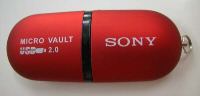

It's exactly the same as the one I had bought, albeit in grey and without the Sony name on it:
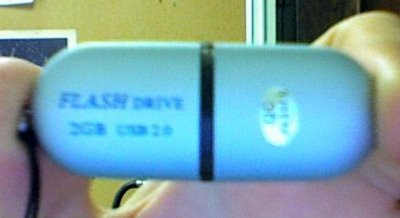


I immediately emailed Factory Direct, and they told me:

They are not fake USB memory sticks but that particular one may be a defective one.

I was told they would replace it with a "good" one if I returned it to the store. (If I can't get a refund, at least I can try to get a different brand, something that's less likely to be fake.)

After some more sleuthing on the net, I came across this interesting thread over on everythingusb.com. It looks like the USB drives have some funky partitioning to fool the OS into thinking they're larger than they are. If you crack open your USB key and punch the model number of the memory chip that's inside into Google, you'll find out how small the USB drive actually is. From the thread, people have even reported their drives having turned out to have just 16 MB of space. Thanks China!
(There's even been some reports of these fake USB drives containing trojans out-of-the-box. For the record, when I tried plugging mine into an XP box, I do think I saw something fishy flash up on the screen for a second like a command prompt...)

As you can probably guess, I'm a little bit ticked off about this. Because I got ripped off? Yes, but moreso because I bought it from a local retailer in Canada, not some sketchy eBay seller in China. Itching for some consumer action, I contacted the RCMP, who informed me that I should contact Cosumer Affairs to handle this (because in my case, there was no Sony logo, so no copyright infringement).
I'm going to try to head back to the Factory Direct store today and try to press them to give me a refund. Either way, I'll still probably end up reporting this to Consumer Affairs (it's still false advertising/branding(?), and tons of other people are going to get screwed by this.)

Last words of wisdom: If you're buying stuff from a shady liquidation store, watch what you get. Hell, if you're buying stuff from any shady store, be it online or locally, be careful. (I suppose this isn't news to anyone, but I learnt it the hard way.)

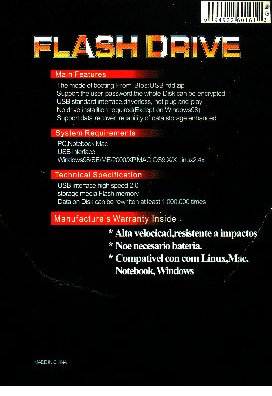
Update: There's absolutely no brand markings on the packaging that came with the USB key (just the words "FLASH DRIVE" and a bunch of flags), but I did find a warranty card that must have fallen out of it. The warranty card reads:

MANUFACTURER WARRANTY
This product is under manufacturer warrarnty.
1. This Flash Drive can be exchanged within 30 days from the day of purchase.
2. If you experience difficulties within the 30 days of purchase, please send the productto:
Customer service
8335 Winnetka Ave. Suite #238
Winnetka, Ca 91306

Please allow three to six week for the exchange.
For more information or to download Driver pelase visit our web site:
WWW.FLASHDRIVEMEMORY.COM

3. This warranty card must be marked by sakes.
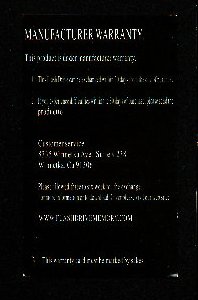
It's interesting that there's no contact information at all besides the address written on the warranty card. I google mapped the address, and yes, it does exist. (If anyone lives near there and they want to go and see is there's actually someone selling/making USB flash drives there, please do and report back. According to the WHOIS for that site, you're looking for an "Appliance Service Co.")
If you go to their website (who's address I'm not actually linking to so that Google won't up their PageRank), the only contact information you'll find is axm@earthlink.net. (Edit: I've just found another one: info@flashdrivememory.com I've sent them an email asking them about their USB drives, so we'll see what they send back. (Wait a second - They have both www.flashdrivememory.com AND www.flashdriveSmemory.com, under the same no-name label...)
Lastly, the third point in the warranty is pure engrish.
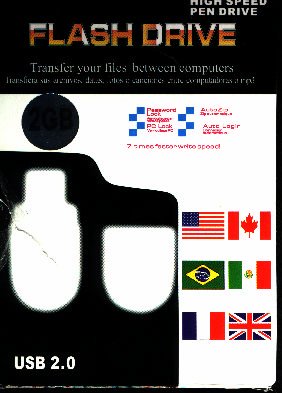

Front of fake USB flash drive packaging
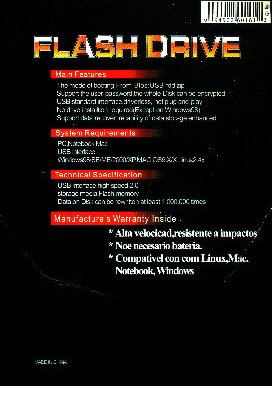

Back of fake USB flash drive packaging


Update #2: Factory Direct took the USB key back and gave me a store credit. They refused to give me a refund, and they didn't appreciate me telling them they might have a shipment of fakes on their hands. The guy said they had sold "hundreds" and only had 3 or 4 returned. I wonder what percentage of people actually tried using more than 256 MB of space (and what percentage tried reading the data back)? 3 or 4 percent? Hmmm....
I received an email back from "FlashDriveMemory" support, and they told me to send the USB key back to them for a replacement.
Did I really just have bad luck and end up with a faulty drive?
I highly doubt it due to the similarity between my experience and others with verified fake USB sticks.
(But that being said, I wonder what would have happened if I had sent it back to the FlashDriveMemory people... )
Oh yeah, and if you WHOIS their domain, you get some more interesting info, but I think I'll stop there. If anyone has anything they'd like to contribute, please leave a comment!

Saturday, July 22, 2006

Istanbul receives overhaul

Istanbul is a simple "desktop session recorder" that allows you to create screencasts. It sits in your notification area, and to use it, you simple click its icon. Its simplicity gave it the potential to become a very useful tool.

However, over the past year it had fallen out of date and contained many bugs, pretty much making it unusable in Ubuntu 6.06 - until now. The creator, Zaheer Abbas Merali, has blogged that Istanbul has just received a UI overhaul and can now record 3D applications as well as composited environments (eg. XGL). For now, if you'd like to try out these updates, you'll have to use the bleeding-edge CVS version, but you can look forward to them in the next release.

Update: That's what I get for writing this article a week ago, but only posting it now - Istanbul 2.0 has been released.

GTK 2.10 - Progress

Ars Technica has an interesting article up on the latest and greatest version of GTK.
Here's the interesting bit:

A new function has been added that will enable GTK applications to detect the presence of a compositing manager like XGL, possibly a prelude to more extensive integration of translucency in various GNOME applications, like real transparency in the GNOME terminal.
Perhaps we'll see something beyond better translucency effects in applications though. Compiz provides some very slick desktop effects, and it'd be neat if applications could trigger some special effects and interact with the window manager in a cool way.
Progress.

Tuesday, July 18, 2006

Novell's GNOME Menu in Ubuntu

One of the features that sets Novell's SUSE Linux Enterprise Desktop (SLED) 10 apart from the pack is it's unique menu replacement for the gnome-panel.
Well, you can now install the new "gnome-main-menu" in Ubuntu.
I had actually tried this a few days ago, but I was pretty turned off by how ugly it looks with the default Ubuntu theme:


Compare with:

Moral to the story: If you install the new gnome-main-menu, change your GNOME theme.
(I'm going to change my theme and give the new menu another shot this week, we'll see how useful it is.)

Monday, July 17, 2006

Full NTFS Support... Again

It looks like the ability to read/write to NTFS partitions in Linux has arrived.... again...

Originally, we had captive-ntfs, which was the first real contender that brought read/write support for NTFS. It worked by wrapping the "NTFS.SYS" driver from Windows, and required a valid Windows license to use (legally, that is). Unfortunately, captive-ntfs wasn't compatible with the 2.6 kernel for a very long time. However, earlier this year, a new version was released that does work with the 2.6 kernel (most modern Linux distributions use the 2.6 kernel, making this a pretty important feature).

Unfortunately, captive-ntfs isn't quite the end-all-be-all solution to the NTFS problem. It's not the speediest method ever conceived and it does require a Windows license to legally use. For most people though, neither of these problems are an issue. Lastly, there are reports that the driver is still rough around the edges.

Meanwhile, the Linux-NTFS project has continued their "slowly but surely" approach to the problem, and it appears that the project may just have reached fruition. The ntfs-3g driver provides a decently fast, completely open-source (and Microsoft-free) approach to the NTFS read/write problem. It's also in active development, unlike the former solution.

If you're dying to be able to write to your NTFS partition, check out the announcement (complete with installation instructions. If you're an Ubuntu user, you can snag some slightly different instructions over here.
(Edit: Or if you're into broken english, here's another easier (aside from the engrish) ntfs-3g Ubuntu HOWTO.)

Read/write support is one of those problems that just hasn't gone away over the years, but it seems like many peoples' hard work is finally paying off. It'll be nice to finally be able to read/write to NTFS drives "out of the box" in Linux.

Friday, July 14, 2006

Last-exit Player and Last.fm

Last-exit is an audio player for the handy last.fm music service. If you have a free Last.fm profile, the player will stream music from artists that it thinks you will like based on your past listening history.

The website for Last-exit gave me a good chuckle when I saw it the first time. If you click the "magic stuff", you'll see some nice screenshots as well. That brings me to my next point: The user interface on this application absolutely kicks ass. It's simple, organized, functional, and looks great.

So what's Last.fm?
Last.fm is a useful website/service for finding artists similar to those that you already listen to. If you use an audio player that has last.fm support, last.fm will automatically build up a profile of what music you listen to. If you login to the last.fm website, it'll show you stats on what you've been listening to, and it'll help you find similar artists. Banshee takes it a step further by integrating some of these stats directly into the player's UI.
Sometimes it tells you about artists that you already know about, but it's usually a great way to expand your taste in music. Personally, I've found it pretty useful in my experience with it, but there's always some interesting bias in the statistics it gives you. For instance, the first few songs that appear in Banshee or Rhythmbox for me get played disproportionately more than other songs in my collection simply because they're at the top and more accessible - not because I like them more. If you keep these sorts of things in mind, it's pretty interesting to see if the music you listen to the most is actually the music you like the most.

Give it a shot!

Edit: A .deb for Ubuntu Dapper is available here. (.DEB updated to version 2, but if you want to run the newer version 3, download the sources.)

Friday, July 07, 2006

Banshee 0.11 Preview

Update: Banshee 0.11 has been released! I've posted instructions on how to install Banshee 0.11 as well.

Music players in Linux have been undergoing a sort of renaissance over the past year. Older programs such as Rhythmbox and Quod Libet have undergone serious active development adding useful new features. Newer contenders like Banshee and Listen have continued to add features in a friendly competition to create the best desktop music player.

In keeping with this competition, the next release of Banshee (version 0.11) is going to have some spiffy new (and long awaited) features.

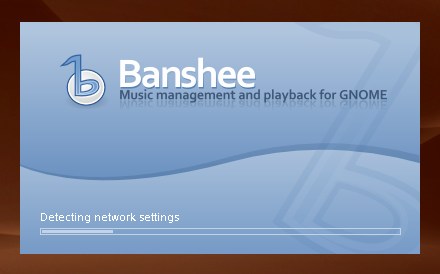
The change is the new splash screen, which has a nice little progress bar on it:


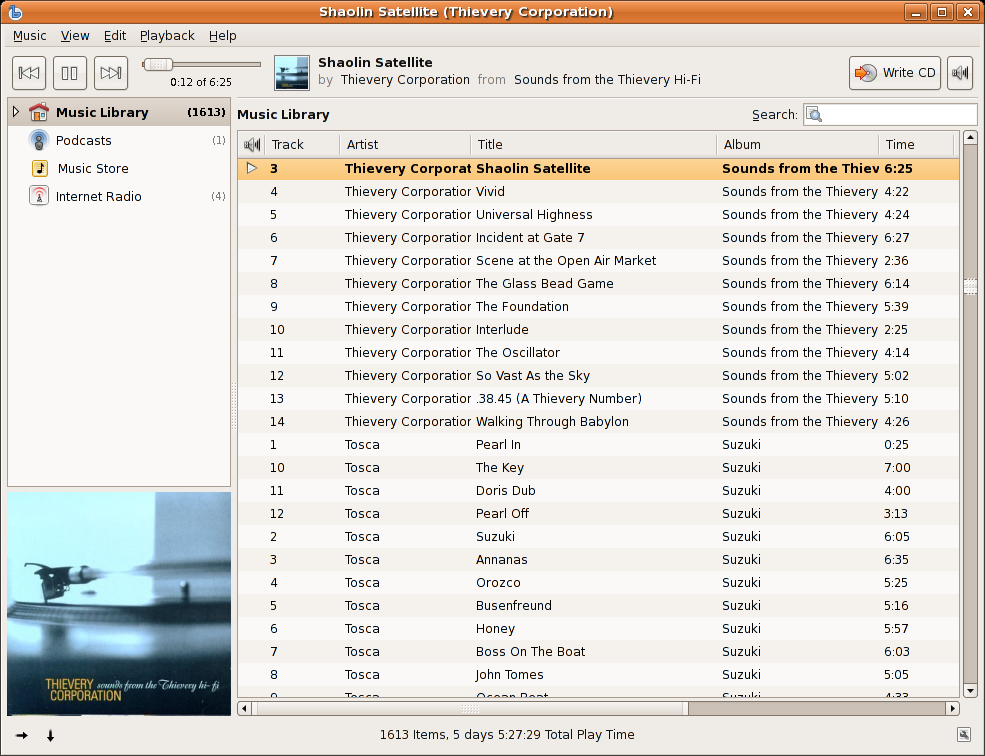
Once Banshee's done loading, you'll recognize the usual simple layout, but it's got a few new additions on the left-hand side:


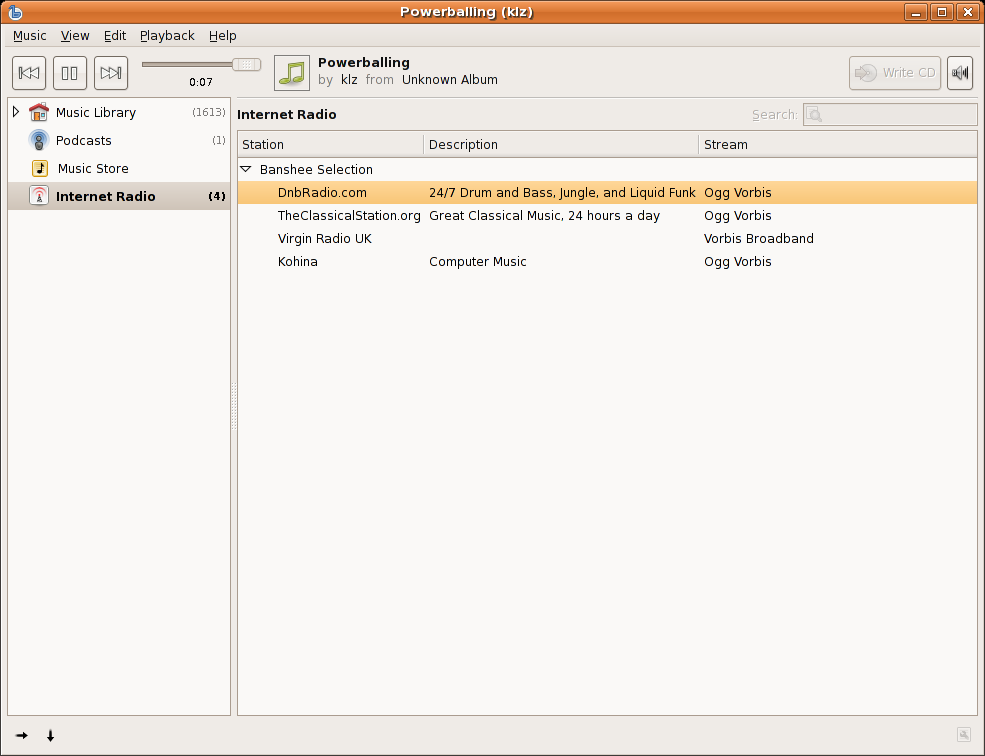
That's right: Banshee's going to have podcast support, internet radio support, and iTunes Music Store (ITMS) support all in one go!

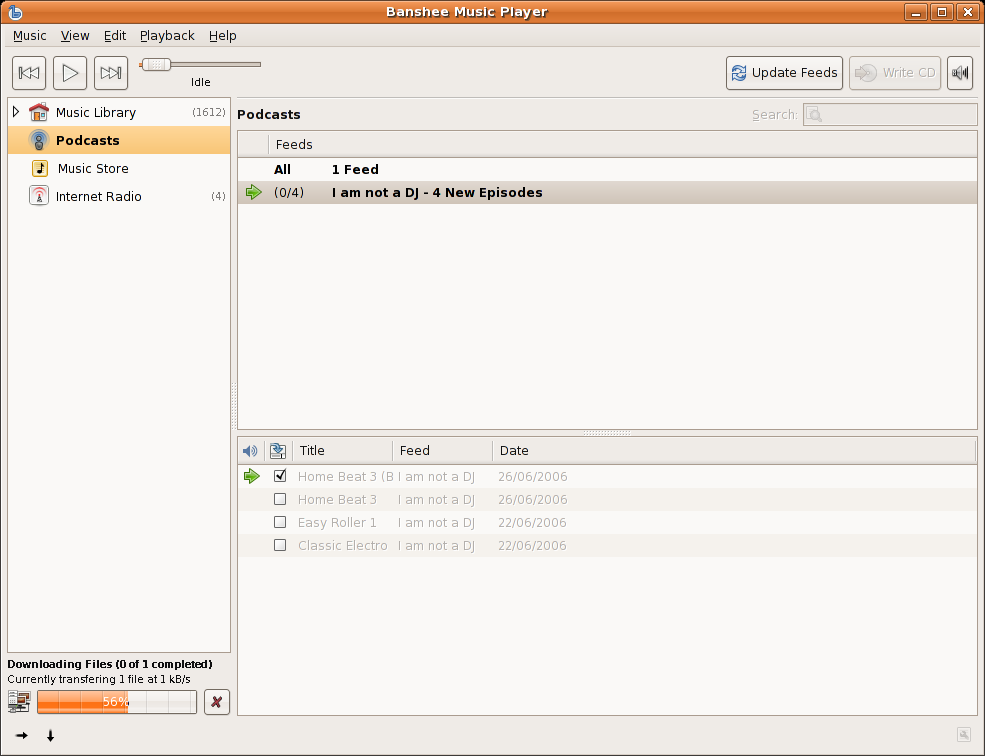
Each of these new features is integrated via plugins, but thanks to the clever design of the plugin architecture, each plugin's features are integrated seamlessly into the user interface:


Podcast support in Banshee


Streaming internet radio in Banshee


ITMS support in Banshee


I haven't personally tested buying anything through ITMS in Banshee, but it looks like it "just works".

This is the Banshee I've been waiting for. With the upcoming 0.11 release of Banshee, I think the project has finally have started to reach maturity, as it's now flush with tons of unique features that are seamlessly integrated into the beautiful user interface.

Lastly, here's a list of all of the major features that'll be included in Banshee's next release:

  • Audioscrobbler/Last.FM support
  • Music sharing (DAAP)
  • Metadata Searching (Automatic covert art and metadata downloading)
  • Multimedia Keys support
  • Podcast support
  • Music Recommendations (through Last.FM)
  • Smart Playlists
  • Streaming Internet Radio
  • iTunes Music Store (ITMS) support
  • Wikipedia/Lyrics support (lookup artist info and lyrics)
  • Full iPod sync support with transcoding
  • CD Playback and Ripping

Drooling yet?
I most certainly am.
:)